[imgui] 7. CSVEditor
목표
- float 데이터를 저장하는 테이블 구현
- csv 형태로 저장, 로드
- 슬라이더로 행, 열 크기 조절가능
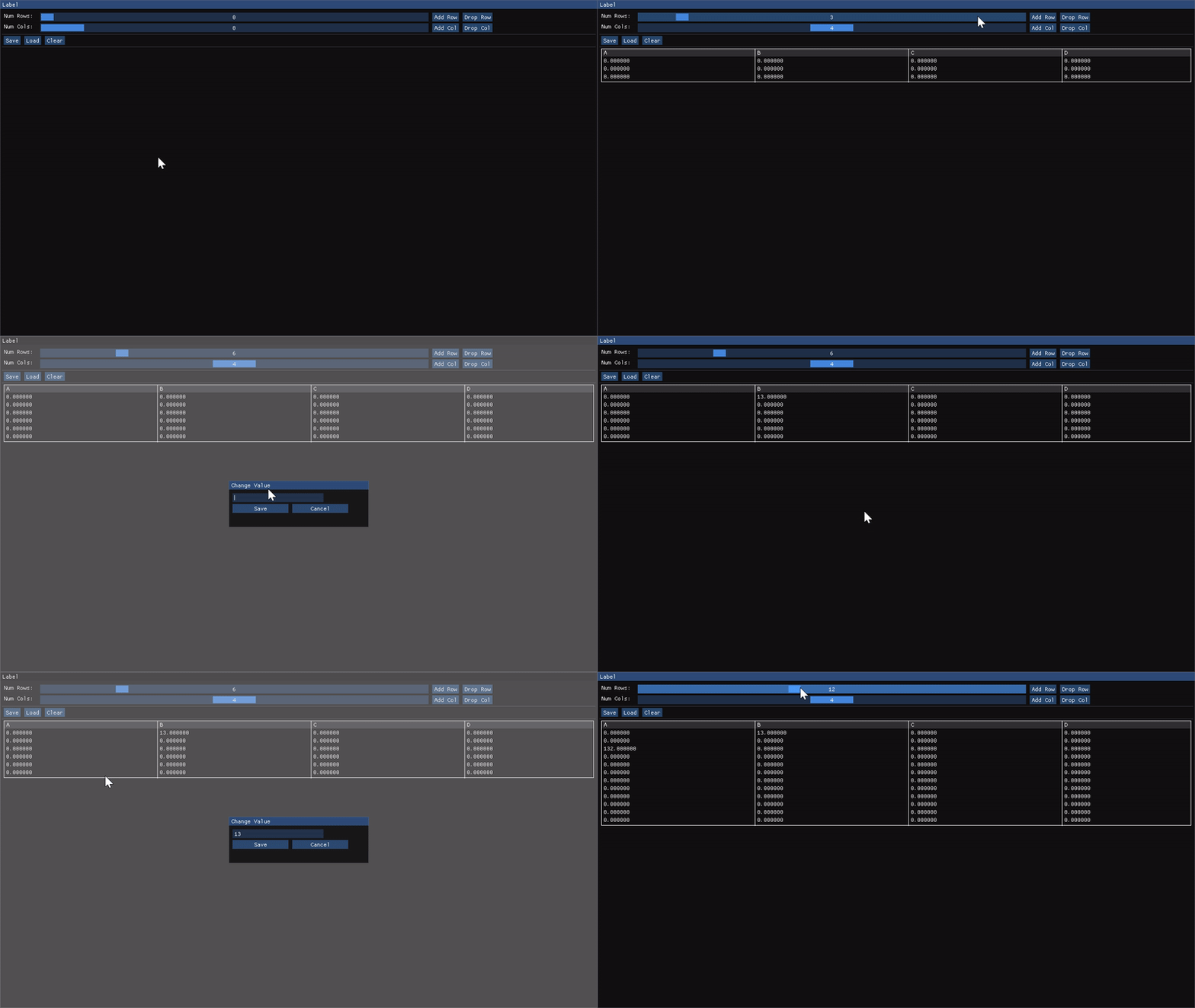
구현코드
메인함수
class WindowClass
{
public:
    static constexpr auto popUpFlags =
        ImGuiWindowFlags_NoResize | ImGuiWindowFlags_NoMove |
        ImGuiWindowFlags_NoCollapse | ImGuiWindowFlags_NoScrollbar;
    static constexpr auto popUpSize = ImVec2(300.0f, 100.0f);
    static constexpr auto popUpButtonSize = ImVec2(120.0f, 0.0f);
    static constexpr auto popUpPos = ImVec2(1280.0f / 2.0f - popUpSize.x / 2.0f,
                                            720.0f / 2.0f - popUpSize.y / 2.0f);

    // 행,열 최대길이
    static constexpr auto maxNumRows = 30;
    static constexpr auto maxNumCols = 8;

public:
    WindowClass()
        : colSize(0), rowSize(0), data({}), filenameBuffer("test.csv"){};
    void Draw(std::string_view label);

private:
    void DrawSizeButtons();       // 행, 열 길이조절하는 슬라이더, 버튼
    void DrawIoButtons();         // Save, Load, Clear
    void DrawTable();             // 실제 테이블이 구현되는곳

    void DrawSavePopup();
    void DrawLoadPopup();

    // 셀 클릭했을때 값 지정할 수 있는 팝업
    void DrawValuePopup(const int row, const int col);

    void SaveToCsvFile(std::string_view filename);
    void LoadFromCsvFile(std::string_view filename);

    // 셀에서 value를 format에 맞게 데이터 출력
    template <typename T>
    void PlotCellValue(std::string_view formatter, const T value);

    // 팝업 레이아웃 설정 모아둔 함수
    void SetPopupLayout();

private:
    std::int32_t colSize;
    std::int32_t rowSize;
    std::vector<std::vector<float>> data;   // 실제 테이블의 셀 데이터

    char filenameBuffer[256];
};
void WindowClass::Draw(std::string_view label)
{
    constexpr static auto window_flags =
        ImGuiWindowFlags_NoResize | ImGuiWindowFlags_NoMove |
        ImGuiWindowFlags_NoCollapse | ImGuiWindowFlags_NoScrollbar;
    constexpr static auto window_size = ImVec2(1280.0F, 720.0F);
    constexpr static auto window_pos = ImVec2(0.0F, 0.0F);

    ImGui::SetNextWindowSize(window_size);
    ImGui::SetNextWindowPos(window_pos);

    ImGui::Begin(label.data(), nullptr, window_flags);

    DrawSizeButtons();
    ImGui::Separator();
    DrawIoButtons();
    ImGui::Separator();
    DrawTable();

    ImGui::End();
}
DrawSizeButton
void WindowClass::DrawSizeButtons()
{
    auto user_control_rows = false;
    auto user_control_cols = false;

    auto slider_value_rows = rowSize;
    auto slider_value_cols = colSize;

    ImGui::Text("Num Rows: ");
    ImGui::SameLine();

    // 정수형 슬라이더 구현.
    // 슬라이더와 버튼이 조작됐는지 체크. 이후 조작여부에 따라 테이블 수정해야되기 때문
    if (ImGui::SliderInt("##numRows", &slider_value_rows, 0, maxNumRows))
    {
        user_control_rows = true;
        rowSize = slider_value_rows;
    }
    ImGui::SameLine();
    if (ImGui::Button("Add Row") && rowSize < maxNumRows)
    {
        ++rowSize;
        user_control_rows = true;
    }
    ImGui::SameLine();
    if (ImGui::Button("Drop Row") && rowSize > 0)
    {
        --rowSize;
        user_control_rows = true;
    }

    ImGui::Text("Num Cols: ");
    /* ... Column 도 Row 처럼 버튼 컨트롤 ... */

    if (user_control_rows)
    {
        // rows 가 변경된 경우, row 추가
        data.resize(rowSize, std::vector<float>(colSize, 0.0f));
    }
    else if (user_control_cols)
    {
        for (auto row = 0; row < rowSize; ++row)
        {
            data[row].resize(colSize, 0.0f);
        }
    }
}
DrawIoButtons
그냥 버튼에 따라 팝업을 호출하는 함수이다.
void WindowClass::DrawIoButtons()
{
    if (ImGui::Button("Save"))
        ImGui::OpenPopup("Save File");
    ImGui::SameLine();
    if (ImGui::Button("Load"))
        ImGui::OpenPopup("Load File");
    ImGui::SameLine();
    if (ImGui::Button("Clear"))
    {
        data.clear();
        rowSize = 0;
        colSize = 0;
    }
    DrawSavePopup();
    DrawLoadPopup();
}
Save / Load 로직
csv 파일이기 때문에 저장이나 로드할때 , 구분자를 이용해서 데이터를 구분했다.
void WindowClass::SaveToCsvFile(std::string_view filename)
{
    auto out = std::ofstream{filename.data()};
    if (!out.is_open())
        return;

    for (std::int32_t row = 0; row < rowSize; ++row)
    {
        for (std::int32_t col = 0; col < colSize; ++col)
        {
            out << data[row][col] << ",";
        }
        out << "\n";
    }
    out.close();
}
DrawTable
데이터를 테이블 형태로 그려주는 함수이다.
// 데이터를 포맷에 맞게 text 요소를 그려주는 함수.
// 테이블을 생성하고 나면 TableNextColumn() 를 호출해야 테이블에 칸이 생성되고
// 칸이 생성된 상태에서 내부에 Text 요소를 넣는것이다.
template <typename T>
void WindowClass::PlotCellValue(std::string_view formatter, const T value)
{
    ImGui::TableNextColumn();
    ImGui::Text(formatter.data(), value);
}

void WindowClass::DrawTable()
{
    constexpr static auto table_flags =
        ImGuiTableFlags_BordersV | ImGuiTableFlags_BordersOuter;

    static auto row_clicked = 0;
    static auto col_clicked = 0;

    if (colSize == 0)
        return;

    // 테이블의 시작. colSize가 1일때부터 테이블이 그려진다.
    ImGui::BeginTable("Table", colSize, table_flags);

    // 열 이름 설정. 테이블이 그려지는데는 상관없지만, 각 열에대한 스타일링도 따로 할수도 있다.
    for (std::int32_t col = 0; col < colSize; ++col)
    {
        const auto col_name = fmt::format("{}", 'A' + col);
        ImGui::TableSetupColumn(col_name.data(),
                                ImGuiTableColumnFlags_WidthFixed,
                                1280.0f / static_cast<float>(colSize));
    }

    // 열 하나를 그리는데, Headers 플래그를 넣어서 강조. 그리고 내부에는 열이름 데이터를 채움
    ImGui::TableNextRow(ImGuiTableRowFlags_Headers);
    for (std::int32_t col = 0; col < colSize; ++col)
        PlotCellValue("%c", 'A' + col);

    for (std::int32_t row = 0; row < rowSize; ++row)
    {
        for (std::int32_t col = 0; col < colSize; ++col)
        {
            PlotCellValue("%f", data[row][col]);
            if (ImGui::IsItemClicked())
            {
                ImGui::OpenPopup("Change Value");
                row_clicked = row;
                col_clicked = col;
            }
            else if (ImGui::IsItemHovered())
            {
                // 마우스만 올려둔 경우 행, 열의 위치를 출력하는 툴팁 그리기
                ImGui::SetTooltip("Cell: (%d, %d)", row, col);
            }
        }
        ImGui::TableNextRow();
    }
    DrawValuePopup(row_clicked, col_clicked);
    ImGui::EndTable();
}
Change Value Popup
얘는 좀 코드가 달라서 추가했다. 비슷하긴함
void WindowClass::DrawValuePopup(const int row, const int col)
{
    static char buffer[64] = { 0, };
    const auto esc_pressed =
        ImGui::IsKeyPressed(ImGui::GetKeyIndex(ImGuiKey_Escape));

    SetPopupLayout();
    if (ImGui::BeginPopupModal("Change Value", nullptr, popUpFlags))
    {
        const auto label = fmt::format("##{}_{}", row, col);
        ImGui::InputText(label.data(), buffer, sizeof(buffer));

        if (ImGui::Button("Save", popUpButtonSize))
        {
            // 값을 data 벡터에 집어넣는다.
            data[row][col] = std::stof(buffer);
            ImGui::CloseCurrentPopup();
        }

        ImGui::SameLine();

        if (ImGui::Button("Cancel", popUpButtonSize) || esc_pressed)
        {
            ImGui::CloseCurrentPopup();
        }
        ImGui::EndPopup();
    }
}
Comments