[imgui] 6. Calendar
목표
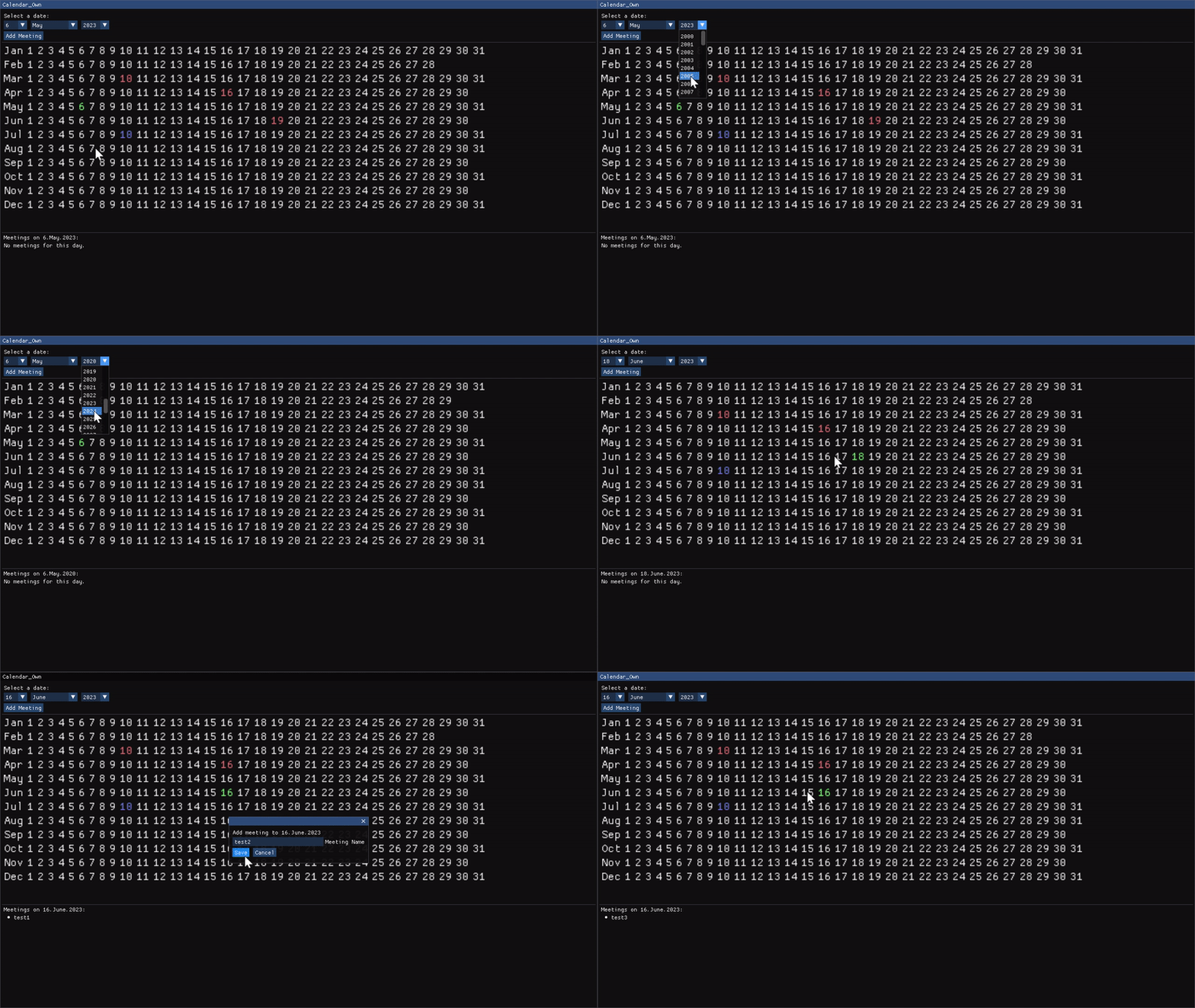
- 해당하는 날짜에 스트링으로 일정을 메모할 수 있는 캘린더앱
- 윤년 적용
- 오늘날짜는 파란색, 선택된날짜는 초록색, 일정이 있다면 빨간색
- 프로그램 종료 시 자동으로 캘린더 파일 저장, 시작 시 로드
구현코드
메인함수
class WindowClass
{
public:
    // Add Meeting 버튼 윈도우 팝업 설정들
    static constexpr auto popUpFlags =
        ImGuiWindowFlags_NoResize | ImGuiWindowFlags_NoMove |
        ImGuiWindowFlags_NoCollapse | ImGuiWindowFlags_NoScrollbar;
    static constexpr auto popUpSize = ImVec2(300.0f, 100.0f);
    static constexpr auto popUpButtonSize = ImVec2(120.0f, 0.0f);
    static constexpr auto popUpPos = ImVec2(1280.0f / 2.0f - popUpSize.x / 2.0f,
                                            720.0f / 2.0f - popUpSize.y / 2.0f);

    // 캘린더 설정들
    static constexpr auto monthNames =
        std::array<std::string_view, 12U>{"January",
                                          "February",
                                          "March",
                                          "April",
                                          "May",
                                          "June",
                                          "July",
                                          "August",
                                          "September",
                                          "October",
                                          "November",
                                          "December"};
    static constexpr auto minYear = 2000U;
    static constexpr auto maxYear = 2038U;

    struct Meeting
    {
        // name 스트링에는 일정 이름을 작성
        std::string name;

        // Serialize는 일정하나를 바이너리형태로 out 스트림에 저장
        // Deserialize는 in 스트림에서 일정하나 불러오기
        void Serialize(std::ofstream& out) const;
        static Meeting Deserialize(std::ifstream& in);

        // 같은 일정이 있는지 비교를 위해 연산자 구현
        // 컴파일 타임에 계산이 가능한경우 미리 계산해둔다.
        constexpr bool operator==(const Meeting& rhs) const
        { return name == rhs.name; }
    };

public:
    WindowClass() : meetings({}) { }
    void Draw(std::string_view label);

public:
    // 일정 불러오기, 저장하기
    void LoadMeetingsFromFile(std::string_view filename);
    void SaveMeetingsToFile(std::string_view filename);

private:
    void DrawDateCombo();         // 날짜선택 콤보박스 출력
    void DrawCalendar();          // 선택한 날짜에 해당하는 달력 출력
    void DrawAddMeetingWindow();  // Add Meeting 윈도우 창
    void DrawMeetingList();       // 미팅리스트를 그려주는창

    void UpdateSelectedDateVariables();   // selectedDate to selected 변수들

private:
    // selected 변수들
    int selectedDay = 1;
    int selectedMonth = 1;
    int selectedYear = 2023;

    std::chrono::year_month_day selectedDate;

    bool addMeetingWindowOpen = false;

    float calendarFontSize = 2.0F;

    // meeting 리스트
    std::map<std::chrono::year_month_day, std::vector<Meeting>> meetings;
};
void WindowClass::Draw(std::string_view label)
{
    constexpr static auto window_flags =
        ImGuiWindowFlags_NoResize | ImGuiWindowFlags_NoMove |
        ImGuiWindowFlags_NoCollapse | ImGuiWindowFlags_NoScrollbar;
    constexpr static auto window_size = ImVec2(1280.0F, 720.0F);
    constexpr static auto window_pos = ImVec2(0.0F, 0.0F);

    ImGui::SetNextWindowSize(window_size);
    ImGui::SetNextWindowPos(window_pos);

    ImGui::Begin(label.data(), nullptr, window_flags);

    DrawDateCombo();
    ImGui::Separator();
    DrawCalendar();
    ImGui::Separator();
    DrawMeetingList();

    // 중첩윈도우는 사용할때 주의해야한다. 어차피 윈도우라 아래의 End() 이후로 옮겨도된다.
    if (addMeetingWindowOpen)
        DrawAddMeetingWindow();

    ImGui::End();
}
DrawDateCombo
콤보박스 버튼 그리기
void WindowClass::DrawDateCombo()
{
    ImGui::Text("Select a date:");

    // 다음 Item의 가로길이 지정
    ImGui::PushItemWidth(50);

    // 콤보의 label, 콤보에 프리뷰로 보여질 문자열
    if (ImGui::BeginCombo("##day", std::to_string(selectedDay).data()))
    {
        for (std::int32_t day_idx = 1; day_idx <= 31; ++day_idx)
        {
            const auto curr_date =
                std::chrono::year_month_day(std::chrono::year(selectedYear),
                                            std::chrono::month(selectedMonth),
                                            std::chrono::day(day_idx));
            // 날짜가 실제로 존재하는지 체크
            if (!curr_date.ok())
                break;

            // 클릭할 수 있는 숫자 출력. 선택된 날짜랑 같다면 강조표시
            if (ImGui::Selectable(std::to_string(day_idx).data(),
                day_idx == selectedDay))
            {
                // 클릭했을때 값 업데이트
                selectedDay = day_idx;
                selectedDate = curr_date;
            }
        }
        ImGui::EndCombo();
    }
    ImGui::PopItemWidth();
    ImGui::SameLine();
    ImGui::PushItemWidth(100);

    /* ... month, year는 day와 동일함 ... */

    // 버튼을 눌렀을때 WindowOpen true로 세팅
    if (ImGui::Button("Add Meeting"))
        addMeetingWindowOpen = true;
}
DrawCalendar
달력 그리기
void WindowClass::DrawCalendar()
{
    // 내부에 요소가 많아서 하나로 묶고, 가로길이 최대, 세로길이 400으로 지정
    const auto child_size = ImVec2(ImGui::GetContentRegionAvail().x, 400.0f);
    ImGui::BeginChild("###calendar", child_size, false);
    const auto original_font_size = ImGui::GetFontSize(); // 기존 폰트사이즈 백업
    ImGui::SetWindowFontScale(calendarFontSize);          // 폰트사이즈 calendarFontSize = 2.0f 배 증가

    // 현재날짜를 days 기준으로 내림처리 (days 까지만 가져오겠다는 뜻)
    const auto curr_time =
        std::chrono::floor<std::chrono::days>(std::chrono::system_clock::now());
    const auto todays_date = std::chrono::year_month_day(curr_time);

    const auto y = selectedYear;
    for (std::int32_t m = 1; m <= 12; ++m)
    {
        // format 함수로 const char* 타입 문자열을 3글자만 가져오기
        ImGui::Text("%s", fmt::format("{:.3}", monthNames[m - 1]).data());
        ImGui::SameLine();

        // 31개의 날짜를 전부 돌면서 존재하는지 체크하고, 있다면 색에 맞게 출력
        for (std::int32_t d = 1; d <= 31; ++d)
        {
            const auto iteration_date =
                std::chrono::year_month_day(std::chrono::year(y),
                                            std::chrono::month(m),
                                            std::chrono::day(d));
            if (!iteration_date.ok())
                break;

            ImGui::SameLine();
            if (todays_date == iteration_date)
                ImGui::TextColored(ImVec4(0.5f, 0.5f, 1.0f, 1.0f), "%d", d);
            else if (selectedDate == iteration_date)
                ImGui::TextColored(ImVec4(0.5f, 1.0f, 0.5f, 1.0f), "%d", d);
            else if (meetings.contains(iteration_date))
                ImGui::TextColored(ImVec4(1.0f, 0.5f, 0.5f, 1.0f), "%d", d);
            else
                ImGui::Text("%d", d);

            // 직전 그려진 요소가 클릭된 경우
            if (ImGui::IsItemClicked())
            {
                selectedDate = iteration_date;
                UpdateSelectedDateVariables();
            }
        }
    }
    ImGui::SetWindowFontScale(original_font_size);
    ImGui::EndChild();
}

void WindowClass::UpdateSelectedDateVariables()
{
    selectedDay = static_cast<int>(selectedDate.day().operator unsigned int());
    selectedMonth = static_cast<int>(selectedDate.month().operator unsigned int());
    selectedYear = static_cast<int>(selectedDate.year());
}
DrawAddMeetingWindow
Popup 형태로도 구현해도되고, PopupModal 형태도 괜찮다.
Window로 구현하면 다른 Window에 가려질 수 있다는 단점이 있다.
void WindowClass::DrawAddMeetingWindow()
{
    static char meeting_name_buffer[128] = "...";


    ImGui::SetNextWindowSize(popUpSize);
    ImGui::SetNextWindowPos(popUpPos);

    // 윈도우 생성
    ImGui::Begin("###addMeeting", &addMeetingWindowOpen, popUpFlags);

    ImGui::Text("Add meeting to %d.%s.%d",
                selectedDay,
                monthNames[selectedMonth - 1].data(),
                selectedYear);
    ImGui::InputText("Meeting Name",
                     meeting_name_buffer,
                     sizeof(meeting_name_buffer));
    if (ImGui::Button("Save"))
    {
        meetings[selectedDate].push_back(Meeting{meeting_name_buffer});
        std::memset(meeting_name_buffer, 0, sizeof(meeting_name_buffer));
        addMeetingWindowOpen = false;
    }
    ImGui::SameLine();
    if (ImGui::Button("Cancel"))
    {
        addMeetingWindowOpen = false;
    }

    ImGui::End();
}
Save / Load 로직
그냥 바이너리 파일 입출력이다. write와 read 함수는 주소값을 매개변수로 받기 때문에 둘다 저장할 변수의 주소값을 넘겨야 한다.
void WindowClass::LoadMeetingsFromFile(std::string_view filename)
{
    auto in = std::ifstream(filename.data());

    if (!in.is_open())
        return;

    // meetings의 size를 먼저 로드해온다.
    auto num_meetings = std::size_t{0};
    in.read(reinterpret_cast<char *>(&num_meetings), sizeof(num_meetings));

    // meeting을 저장했던 map의 키 숫자만큼 반복
    for (std::size_t i = 0; i < num_meetings; ++i)
    {
        // 날짜를 로드
        auto date = std::chrono::year_month_day{};
        in.read(reinterpret_cast<char *>(&date), sizeof(date));

        // 날짜에 해당하는 meeting들이 몇개가 있는지
        auto num_meetings_on_that_date = std::size_t{0};
        in.read(reinterpret_cast<char *>(&num_meetings_on_that_date),
                sizeof(num_meetings_on_that_date));

        // 날짜에 해당하는 meeting 숫자만큼 반복
        for (std::size_t j = 0; j < num_meetings_on_that_date; ++j)
        {
            // 하나씩 meeting에 꺼내오고 meetings벡터에 push해줌
            auto meeting = Meeting::Deserialize(in);
            meetings[date].push_back(meeting);
        }
    }

    in.close();
}

WindowClass::Meeting WindowClass::Meeting::Deserialize(std::ifstream &in)
{
    auto meeting = Meeting{};
    auto name_length = std::size_t{0};
    in.read(reinterpret_cast<char *>(&name_length), sizeof(name_length));

    meeting.name.resize(name_length);
    in.read(meeting.name.data(), static_cast<std::streamsize>(name_length));

    return meeting;
}
DrawMeetingList
void WindowClass::DrawMeetingList()
{
    if (meetings.empty())
    {
        ImGui::Text("No meetings at all.");
        return;
    }

    ImGui::Text("Meetings on %d.%s.%d: ",
                selectedDay,
                monthNames[selectedMonth - 1].data(),
                selectedYear);

    // 키가 있는지 체크하지 않으면 meetings[selectedDate].empty() 함수를 호출하면서 키가 들어가게된다.
    if (!meetings.contains(selectedDate) || meetings[selectedDate].empty())
    {
        ImGui::Text("No meetings for this day.");
        return;
    }

    for (const auto& meeting : meetings[selectedDate])
    {
        // 순서없는 점형태 목록에 텍스트 출력
        ImGui::BulletText("%s", meeting.name.data());
        if (ImGui::IsItemClicked(ImGuiMouseButton_Left))
        {
            std::erase(meetings[selectedDate], meeting);
            return;
        }
    }
}
Comments