[imgui] 5. Paint 구현
목표
- 그림판을 만들기
- 색 변경, 펜 두께 변경, Save, Load, CLear 기능
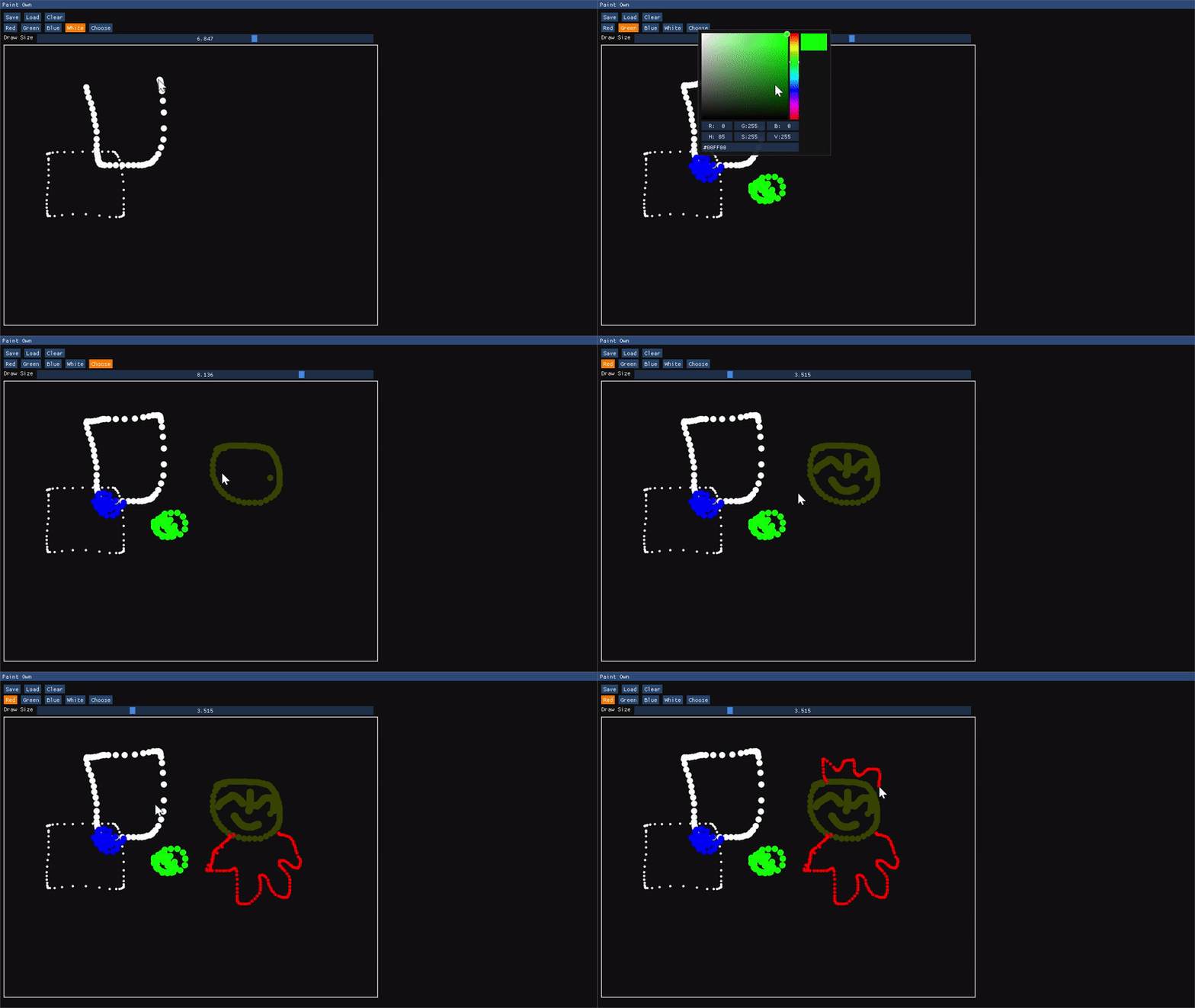
Paint
구현코드
메인함수
#include <cstdint>
#include <string_view>
#include <imgui.h>
#include <vector>

class WindowClass
{
public:
    // position, color, size 3가지 데이터를 묶어서 하나의 PointData로 사용
    using PointData = std::tuple<ImVec2, ImColor, float>;

    static constexpr auto popUpFlags =
        ImGuiWindowFlags_NoResize | ImGuiWindowFlags_NoMove |
        ImGuiWindowFlags_NoCollapse | ImGuiWindowFlags_NoScrollbar;
    static constexpr auto popUpSize = ImVec2(300.0f, 100.0f);
    static constexpr auto popUpButtonSize = ImVec2(120.0f, 0.0f);
    static constexpr auto popUpPos = ImVec2(1280.0f / 2.0f - popUpSize.x / 2.0f,
                                            720.0f / 2.0f - popUpSize.y / 2.0f);

public:
    WindowClass()
        : points({}), canvasPos({}), currentDrawColor(ImColor(255, 255, 255)),
          pointDrawSize(2.0F), filenameBuffer("test.bin"){};

    void Draw(std::string_view label);

private:
    void DrawMenu();          // 색선택, Size선택, Save, Load 버튼등
    void DrawCanvas();        // 캔버스 그리기
    void DrawColorButtons();  // 색션택 버튼을 모듈화
    void DrawSizeSettings();  // 사이즈 선택을 모듈화
    void ClearCanvas();       // 캔버스 클리어

    // 바이너리로 PointData 저장 및 복원
    void SaveToImageFile(std::string_view filename);
    void LoadFromImageFile(std::string_view filename);

    // 이전에 TextEditor에서 사용한팝업
    void DrawSavePopup();
    void DrawLoadPopup();

private:
    // 캔버스 가로 세로 길이, 컬러채널
    std::uint32_t numRows = 800;    // Row's size;
    std::uint32_t numCols = 600;    // Column's size;
    std::uint32_t numChannels = 3;

    ImVec2 canvasPos;
    ImVec2 canvasSize = ImVec2(static_cast<float>(numRows), static_cast<float>(numCols));

    std::vector<PointData> points;  // 실제 그림 데이터가 저장되는곳
    ImColor currentDrawColor;       // 선택된 Color
    float pointDrawSize;            // point(Dot) Size;

    char filenameBuffer[256];
};
void WindowClass::Draw(std::string_view label)
{
constexpr static auto window_flags =
ImGuiWindowFlags_NoResize | ImGuiWindowFlags_NoMove |
ImGuiWindowFlags_NoCollapse | ImGuiWindowFlags_NoScrollbar;
constexpr static auto window_size = ImVec2(1280.0F, 720.0F);
constexpr static auto window_pos = ImVec2(0.0F, 0.0F);
ImGui::SetNextWindowSize(window_size);
ImGui::SetNextWindowPos(window_pos);

ImGui::Begin(label.data(), nullptr, window_flags);

DrawMenu();
DrawCanvas();

ImGui::End();
}
DrawMenu
버튼을 만들고, save, load 버튼을 눌렀을때 팝업 띄우는건 TextEditor와 중복된다.
DrawMenu 코드 내부에서 ClearCanvas, DrawColorButtons, DrawSizeSettings 를 호출해서 그린다.
이전과 중복된 코드
void WindowClass::DrawMenu()
{
    const auto ctrl_pressed = ImGui::GetIO().KeyCtrl;
    const auto esc_pressed =
        ImGui::IsKeyPressed(ImGui::GetKeyIndex(ImGuiKey_Escape));
    const auto s_pressed = ImGui::IsKeyPressed(ImGui::GetKeyIndex(ImGuiKey_S));
    const auto l_pressed = ImGui::IsKeyPressed(ImGui::GetKeyIndex(ImGuiKey_L));


    if (ImGui::Button("Save") || (ctrl_pressed && s_pressed))
    {
        ImGui::OpenPopup("Save Image");
    }

    ImGui::SameLine();

    if (ImGui::Button("Load") || (ctrl_pressed && l_pressed))
    {
        ImGui::OpenPopup("Load Image");
    }

    ImGui::SameLine();

    if (ImGui::Button("Clear"))
        ClearCanvas();

    DrawColorButtons();
    DrawSizeSettings();

    DrawSavePopup();
    DrawLoadPopup();
}
void WindowClass::DrawSavePopup()
{
    static char saveFilenameBuffer[256];
    const auto esc_pressed =
        ImGui::IsKeyPressed(ImGui::GetKeyIndex(ImGuiKey_Escape));

    ImGui::SetNextWindowSize(popUpSize);
    ImGui::SetNextWindowPos(popUpPos);
    if (ImGui::BeginPopupModal("Save Image", nullptr, popUpFlags))
    {
        ImGui::InputText("Filename",
                         saveFilenameBuffer,
                         sizeof(saveFilenameBuffer));

        if (ImGui::Button("Save", popUpButtonSize))
        {
            SaveToImageFile(filenameBuffer);
            ImGui::CloseCurrentPopup();
        }

        ImGui::SameLine();

        if (ImGui::Button("Cancel", popUpButtonSize) || esc_pressed)
        {
            ImGui::CloseCurrentPopup();
        }
        ImGui::EndPopup();
    }
}
void WindowClass::DrawLoadPopup()
{
    static char loadFilenameBuffer[256];
    const auto esc_pressed =
        ImGui::IsKeyPressed(ImGui::GetKeyIndex(ImGuiKey_Escape));

    ImGui::SetNextWindowSize(popUpSize);
    ImGui::SetNextWindowPos(popUpPos);
    if (ImGui::BeginPopupModal("Load Image", nullptr, popUpFlags))
    {
        ImGui::InputText("Filename",
                         loadFilenameBuffer,
                         sizeof(loadFilenameBuffer));

        if (ImGui::Button("Load", popUpButtonSize))
        {
            LoadFromImageFile(filenameBuffer);
            ImGui::CloseCurrentPopup();
        }

        ImGui::SameLine();

        if (ImGui::Button("Cancel", popUpButtonSize) || esc_pressed)
        {
            ImGui::CloseCurrentPopup();
        }
        ImGui::EndPopup();
    }
}
DrawColorButtons / DrawSizeSettings
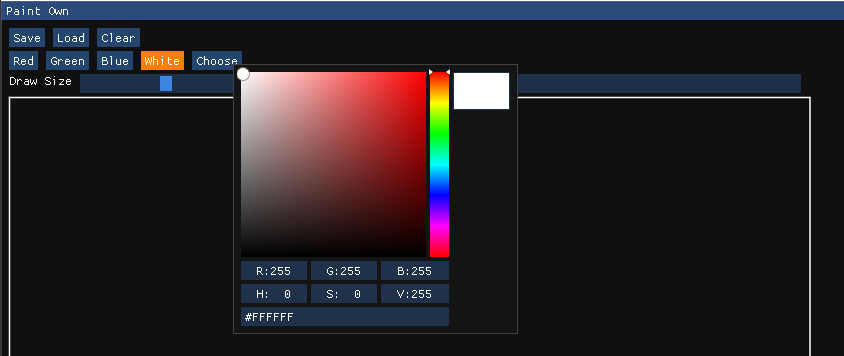
void WindowClass::DrawColorButtons()
{
const auto selected_red = currentDrawColor == ImColor(255, 0, 0);
const auto selected_green = currentDrawColor == ImColor(0, 255, 0);
const auto selected_blue = currentDrawColor == ImColor(0, 0, 255);
const auto selected_white = currentDrawColor == ImColor(255, 255, 255);
const auto none_preset_color =
!selected_red && !selected_green && !selected_blue && !selected_white;
constexpr static auto orange = ImVec4(1.0F, 0.5F, 0.0F, 1.0F);
// 만약 선택됐다면, 버튼 색상을 orange로 변경
if (selected_red)
ImGui::PushStyleColor(ImGuiCol_Button, orange);
if (ImGui::Button("Red"))
currentDrawColor = ImColor(255, 0, 0);
if (selected_red)
ImGui::PopStyleColor();
// 나갈땐 스택에서 pop 해줘야 다른버튼에 영향을 주지 않는다.
ImGui::SameLine();
/* ... selected_green, selected_blue, selected_white 중복코드 생략 ... */
if (none_preset_color)
ImGui::PushStyleColor(ImGuiCol_Button, orange);
if (ImGui::Button("Choose"))
ImGui::OpenPopup("Color Picker");
// 일반 Popup으로 호출
if (ImGui::BeginPopup("Color Picker"))
{
ImGui::ColorPicker3("##picker", reinterpret_cast<float *>(¤tDrawColor));
ImGui::EndPopup();
}
if (none_preset_color)
ImGui::PopStyleColor();
}
void WindowClass::DrawSizeSettings()
{
ImGui::Text("Draw Size");
ImGui::SameLine();
// 다음 요소의 최대 가로길이를 지정. canvas를 넘지않도록 계산.
ImGui::PushItemWidth(canvasSize.x - ImGui::GetCursorPosX());
// Float 값범위를 사용하는 한개짜리 Slider이며, 1~10 까지 설정가능하다.
ImGui::SliderFloat("##drawSize", &pointDrawSize, 1.0F, 10.0F);
ImGui::PopItemWidth();
}
Save / Load ImageFile
내 맘대로 자체적인 포맷을 만들어서 바이너리 파일 저장, 로드
void WindowClass::SaveToImageFile(std::string_view filename)
{
    // 이진 파일은 2번째 인자로 std::ios::binary 를 넣어줘야한다.
    auto out = std::ofstream(filename.data(), std::ios::binary);


    // is_open 만 사용해도 된다. !연산자는 failbit, badbit가 설정된경우 true를 리턴해준다.
    if (!out || !out.is_open())
        return;

    // 첫번째 값은 size_t (내환경에선 64bit) 크기의 PointData 벡터의 길이 쓰기
    // write가 const char* 기준으로 작성되어있다.
    // 메모리상 숫자는 거꾸로 저장되어있지만, 어차피 앞바이트부터 1byte씩 쓰기 때문에 순서에 맞게 저장된다
    const auto point_count = points.size();
    out.write(reinterpret_cast<const char *>(&point_count),
              sizeof(point_count));

    // 포인트 벡터에서 그린 점들에 대한 정보를 하나씩(1px) 꺼내서 저장
    for (const auto& [point, color, size] : points)
    {
        // 파일에 하나씩 point, color, size를 차곡차곡 저장
        out.write(reinterpret_cast<const char *>(&point), sizeof(point));
        out.write(reinterpret_cast<const char *>(&color), sizeof(color));
        out.write(reinterpret_cast<const char *>(&size), sizeof(size));
    }
    out.close();
}

void WindowClass::LoadFromImageFile(std::string_view filename)
{
    auto in = std::ifstream(filename.data(), std::ios::binary);

    if (!in || !in.is_open())
        return;

    auto point_count = std::size_t{0};
    in.read(reinterpret_cast<char *>(&point_count), sizeof(point_count));

    for (std::size_t i = 0; i < point_count; ++i)
    {
        auto point = ImVec2{};
        auto color = ImColor{};
        auto size = float{};

        in.read(reinterpret_cast<char *>(&point), sizeof(point));
        in.read(reinterpret_cast<char *>(&color), sizeof(color));
        in.read(reinterpret_cast<char *>(&size), sizeof(size));

        points.push_back(std::make_tuple(point, color, size));
    }
    in.close();

}
DrawCanvas
void WindowClass::DrawCanvas()
{
    canvasPos = ImGui::GetCursorPos();    // canvas 위치
    const auto border_thickness = 1.5F;   // boorder 두께

    // 캔버스의 실제 사이즈. 원하는 사이즈 + border 4방향 추가한 크기
    const auto button_size = ImVec2(canvasSize.x + 2.0F * border_thickness,
                                    canvasSize.y + 2.0F * border_thickness);
    // 사실 canvas는 Button이다.
    ImGui::InvisibleButton("##canvas", button_size);

    // mouse 좌표를 얻어오고, 마우스가 이전요소(InvisibleButton)에 Hovering되어있는지 확인
    const auto mouse_pos = ImGui::GetMousePos();
    const auto is_mouse_hovering = ImGui::IsItemHovered();

    // 버튼 위에서 좌클릭한 경우
    if (is_mouse_hovering && ImGui::IsMouseDown(ImGuiMouseButton_Left))
    {
        // points에 들어가는 값은 border 등에 영향받지 않은 0,0부터 시작되게 하기위함
        const auto point = ImVec2(mouse_pos.x - canvasPos.x - border_thickness,
                                  mouse_pos.y - canvasPos.y - border_thickness);
        // 점 하나 저장. 이 점들은 push_back되어 위치순이 아니라 시간순으로 정렬된다.
        points.push_back(
            std::make_tuple(point, currentDrawColor, pointDrawSize));
    }

    // 나중에 렌더링 과정에서 그려줄 작업 리스트를 가져온다.
    auto *draw_list = ImGui::GetWindowDrawList();
    for (const auto& [point, color, size] : points)
    {
        const auto pos = ImVec2(canvasPos.x + border_thickness + point.x,
                                canvasPos.y + border_thickness + point.y);
        // 작업 리스트에 색이 채워진 원을 추가한다.
        draw_list->AddCircleFilled(pos, size, color);
    }

    // border 그리기
    const auto border_min = canvasPos;
    const auto border_max =
        ImVec2(canvasPos.x + button_size.x - border_thickness,
               canvasPos.y + button_size.y - border_thickness);
    // 작업 리스트에 비어있는 사각형을 추가한다.
    draw_list->AddRect(border_min,
                       border_max,
                       IM_COL32(255, 255, 255, 255),
                       0.0F,
                       ImDrawCornerFlags_All,
                       border_thickness);
}
Comments