[imgui] 4. DiffViewer 구현
목표
- 두 파일에서 다른 라인은 빨간색으로 표시
- 다른 라인 수에 대한 카운트
- 버튼으로 해당 라인 덮어쓰기
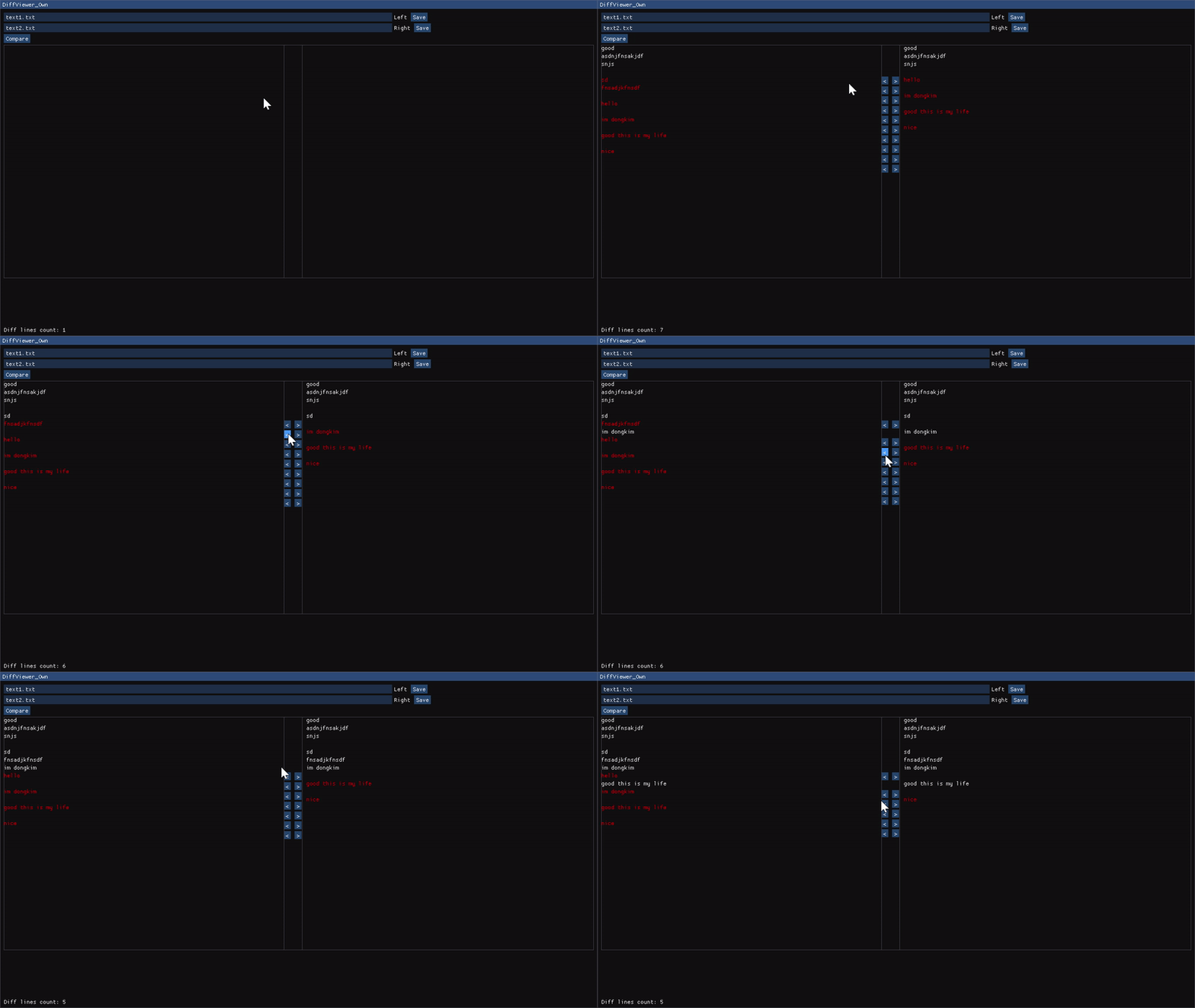
DiffViewer
구현 코드
메인함수
#include <cstdint>
#include <string_view>
#include <vector>
#include <string>

class WindowClass
{
public:
    // 파일의 내용은 vector에 스트링형태로 저장
    using FileContent = std::vector<std::string>;

public:
    WindowClass() : filePath1("text1.txt"), filePath2("text2.txt"),
        fileContent1({}), fileContent2({}),
          diffResult1({}), diffResult2({})
    {}

    void Draw(std::string_view label);

private:
    void DrawSelection();   // 파일 선택 + Compare버튼 메뉴바
    void DrawDiffView();    // 파일 로드 후 비교해서 보여주는 화면
    void DrawStats();       // 다른라인 수를 출력

    // 파일 로드, 세이브
    FileContent LoadFileContent(std::string_view file_path);
    void SaveFileContent(std::string_view file_path, FileContent fileContent);

    // 로드된 파일들의 차이점을 계산하는 함수
    void CreateDiff();

private:
    std::string filePath1;
    std::string filePath2;

    FileContent fileContent1;
    FileContent fileContent2;

    FileContent diffResult1;
    FileContent diffResult2;
};

void render(WindowClass &window_obj);
void WindowClass::Draw(std::string_view label)
{
    constexpr static auto window_flags =
        ImGuiWindowFlags_NoResize | ImGuiWindowFlags_NoMove |
        ImGuiWindowFlags_NoCollapse | ImGuiWindowFlags_NoScrollbar;
    constexpr static auto window_size = ImVec2(1280.0F, 720.0F);
    constexpr static auto window_pos = ImVec2(0.0F, 0.0F);

    ImGui::SetNextWindowSize(window_size);
    ImGui::SetNextWindowPos(window_pos);

    ImGui::Begin(label.data(), nullptr, window_flags);

    DrawSelection();
    DrawDiffView();
    DrawStats();

    ImGui::End();
}
DrawSelection
WindowClass::FileContent WindowClass::LoadFileContent(std::string_view file_path)
{
    // FileContent 타입은 vector<string> 이다.
    auto content = FileContent();

    auto in = std::ifstream(file_path.data());
    if (in.is_open())
    {
        // 파일을 열고 개행기준으로 한줄씩 가져와서 vector에 push
        auto line = std::string{};
        while (std::getline(in, line))
            content.push_back(line);
    }
    in.close();
    return content;
}

void WindowClass::SaveFileContent(std::string_view file_path,
                                  FileContent fileContent)
{
    auto out = std::ofstream(file_path.data());
    if (out.is_open())
    {
        // 저장할땐 한줄씩 꺼내와서 개행까지 추가
        for (const auto& s : fileContent)
            out << s << '\n';
    }
    out.close();
}

void WindowClass::CreateDiff()
{
    diffResult1.clear();
    diffResult2.clear();

    const auto max_num_lines =
        std::max(fileContent1.size(), fileContent2.size());

    for (std::size_t i = 0; i < max_num_lines; ++i)
    {
        const auto line1 = i < fileContent1.size() ? fileContent1[i] : "EMPTY";
        const auto line2 = i < fileContent2.size() ? fileContent2[i] : "EMPTY";

        if (line1 != line2)
        {
            // 모든 줄을 비교해서 다른점이 있으면 diffResult에 하나씩 저장
            diffResult1.push_back(line1);
            diffResult2.push_back(line2);
        }
        else
        {
            // 같으면 빈 문자열 저장
            diffResult1.push_back("");
            diffResult2.push_back("");
        }
    }
}

void WindowClass::DrawSelection()
{
    ImGui::InputText("Left", &filePath1);
    ImGui::SameLine();

    // Right에도 Save 버튼이 있기 때문에 ### 로 숨겨진 글자를 추가해서 유니크한 label 생성
    if (ImGui::Button("Save###Left"))
        SaveFileContent(filePath1, fileContent1);
    ImGui::InputText("Right", &filePath2);
    ImGui::SameLine();
    if (ImGui::Button("Save###Right"))
        SaveFileContent(filePath2, fileContent2);

    if (ImGui::Button("Compare"))
    {
        fileContent1 = LoadFileContent(filePath1);
        fileContent2 = LoadFileContent(filePath2);

        CreateDiff();
    }
}
DrawDiffView
void WindowClass::DrawDiffView()
{
    constexpr static auto swap_width = 40.0f;
    const auto parent_size = ImVec2(ImGui::GetContentRegionAvail().x, 500.0f);
    const auto child_size = ImVec2(parent_size.x / 2.0f - swap_width, parent_size.y);

    const auto swap_size = ImVec2(swap_width, child_size.y);

    // 패딩 없애기
    ImGui::PushStyleVar(ImGuiStyleVar_WindowPadding, ImVec2(0.0f, 0.0f));

    // Diff 화면 + Swap 버튼을 엮은 요소. 3번째 인자는 border를 넣을지?
    ImGui::BeginChild("Parent", parent_size, true);

    if (ImGui::BeginChild("Diff1", child_size, false))
    {
        for (std::size_t i = 0; i < fileContent1.size(); ++i)
        {
            // 다른점이 있다면 색을 지정한 텍스트를 출력. ImVec4(R,G,B,Alpha)
            if (!diffResult1[i].empty())
                ImGui::TextColored(ImVec4(1.0f, 0.0f, 0.0f, 1.0f),
                                   "%s",
                                   fileContent1[i].data());
            else
                ImGui::Text("%s", fileContent1[i].data());
        }
    }
    ImGui::EndChild();
    ImGui::SameLine();

    const auto line_height = ImGui::GetTextLineHeightWithSpacing();
    const auto button_size = ImVec2(15.0f, line_height);

    if (ImGui::BeginChild("Swap", swap_size, true))
    {
        for (std::size_t i = 0; i < diffResult1.size(); ++i)
        {
            const auto left_label = fmt::format("<##{}", i);
            const auto right_label = fmt::format(">##{}", i);

            // 둘중 하나라도 다르면 Swap 버튼 구현
            if (!diffResult1[i].empty() || !diffResult2[i].empty())
            {
                if (ImGui::Button(left_label.data(), button_size))
                {
                    if (fileContent1.size() > i && fileContent2.size() > i)
                        fileContent1[i] = fileContent2[i];
                    else if (fileContent2.size() > i)
                        fileContent1.push_back(fileContent2[i]);
                    CreateDiff();
                }

                ImGui::SameLine();

                if (ImGui::Button(right_label.data(), button_size))
                {
                    if (fileContent2.size() > i && fileContent1.size() > i)
                        fileContent2[i] = fileContent1[i];
                    else if (fileContent1.size() > i)
                        fileContent2.push_back(fileContent1[i]);
                    CreateDiff();
                }
            }
            else
            {
                ImGui::SetCursorPosY(ImGui::GetCursorPosY() + line_height);
            }
        }
    }
    ImGui::EndChild();
    ImGui::SameLine();

    if (ImGui::BeginChild("Diff2"))
    {
        for (std::size_t i = 0; i < fileContent2.size(); ++i)
        {
            if (!diffResult2[i].empty())
                ImGui::TextColored(ImVec4(1.0f, 0.0f, 0.0f, 1.0f),
                                   "%s",
                                   fileContent2[i].data());
            else
                ImGui::Text("%s", fileContent2[i].data());
        }
    }
    ImGui::EndChild();

    ImGui::EndChild();
    ImGui::PopStyleVar();
}
DrawStats
File1 기준으로 다른 라인 수 출력
void WindowClass::DrawStats()
{
    auto diff_lines_count = std::size_t{0};
    for (const auto& line : diffResult1)
    {
        if (!line.empty())
            ++diff_lines_count;
    }

    // 현재 위치 기준으로 위치 조절
    // ImGui::SetCursorPosY(ImGui::GetCursorPosY() + 20.0f);
    // 전체 윈도우 크기 기준으로 위치 조절
    ImGui::SetCursorPosY(ImGui::GetWindowHeight() - 20.0f);
    ImGui::Text("Diff lines count: %u", diff_lines_count);
}
Comments