[imgui] 3. TextEditor 구현
목표
- 텍스트 편집이 가능한 텍스트 에디터
- 파일의 줄 수를 표시
- 텍스트파일 저장과 로드 기능 (키보드 단축키까지)
- 현재 열린 파일명, 확장자 확인가능
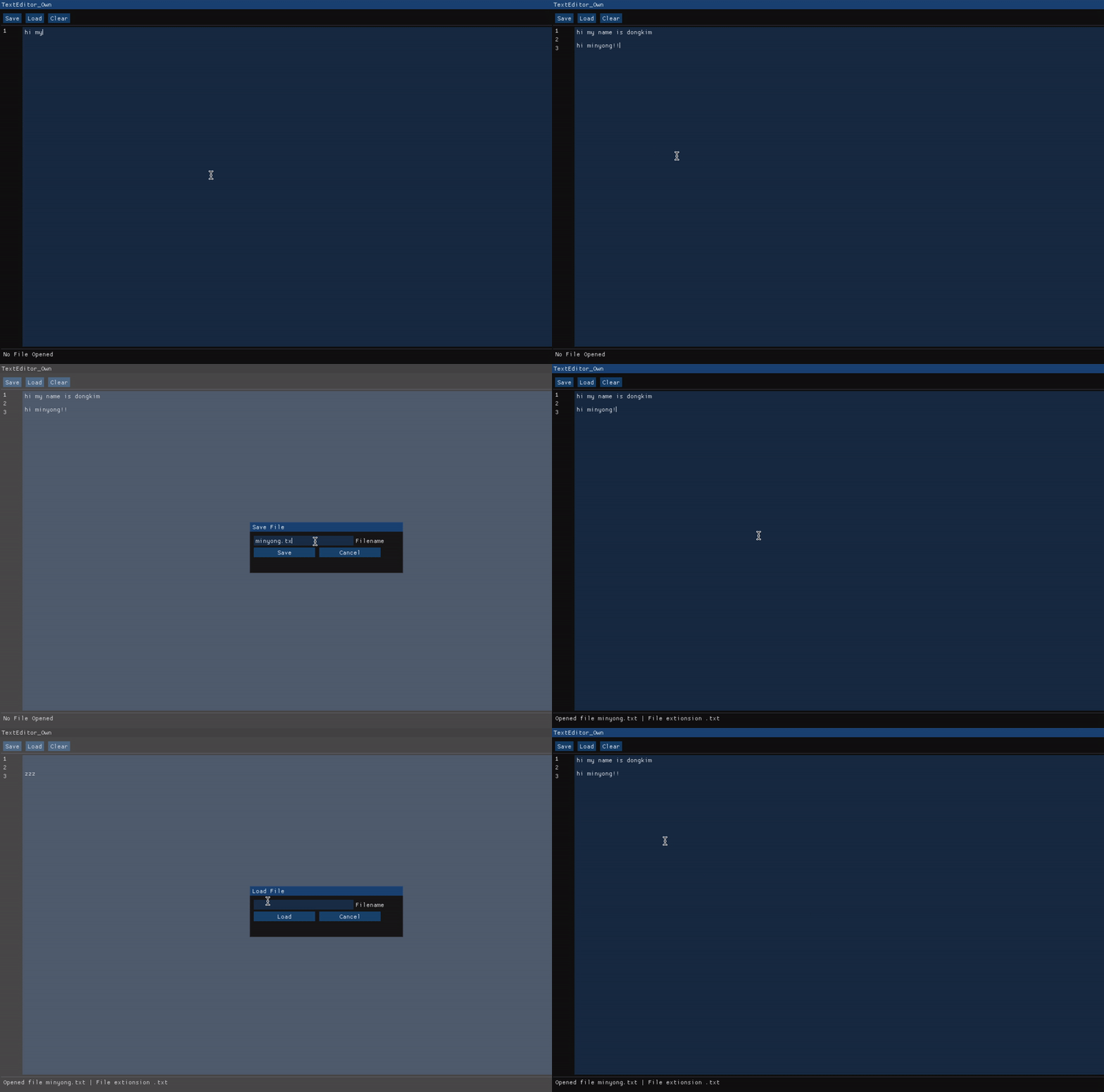
TextEditor
구현 코드
메인함수
#include <cstring>
#include <string>
#include <cstdint>
#include <string_view>
#include <filesystem>

namespace fs = std::filesystem;

class WindowClass
{
public:
    // 코드에서 사용할 상수값들 초기화
    static constexpr auto bufferSize = std::size_t{1024};

    static constexpr auto popUpFlags =
        ImGuiWindowFlags_NoResize | ImGuiWindowFlags_NoMove |
        ImGuiWindowFlags_NoCollapse | ImGuiWindowFlags_NoScrollbar;
    static constexpr auto popUpSize = ImVec2(300.0f, 100.0f);
    static constexpr auto popUpButtonSize = ImVec2(120.0f, 0.0f);
    static constexpr auto popUpPos = ImVec2(1280.0f / 2.0f - popUpSize.x / 2.0f,
                                            720.0f / 2.0f - popUpSize.y / 2.0f);

public:
    WindowClass() : currentFilename({})
    {
        std::memset(textBuffer, 0, bufferSize);
    }

    void Draw(std::string_view label);

private:
    void DrawMenu();
    void DrawContent();
    void DrawInfo();

    void DrawSavePopup();
    void DrawLoadPopup();

    // 실제 저장, 로드 기능
    void SaveToFile(std::string_view filename);
    void LoadFromFile(std::string_view filename);

    std::string GetFileExtension(std::string_view filename);

private:
    // 텍스트에디터의 텍스트버퍼
    char textBuffer[bufferSize];
    std::string currentFilename;
};

void render(WindowClass &window_obj);
void WindowClass::Draw(std::string_view label)
{
    constexpr static auto window_flags =
        ImGuiWindowFlags_NoResize | ImGuiWindowFlags_NoMove |
        ImGuiWindowFlags_NoCollapse | ImGuiWindowFlags_NoScrollbar;
    constexpr static auto window_size = ImVec2(1280.0F, 720.0F);
    constexpr static auto window_pos = ImVec2(0.0F, 0.0F);

    ImGui::SetNextWindowSize(window_size);
    ImGui::SetNextWindowPos(window_pos);

    ImGui::Begin(label.data(), nullptr, window_flags);

    DrawMenu();
    ImGui::Separator();

    DrawContent();
    ImGui::Separator();

    DrawInfo();

    ImGui::End();
}
DrawMenu
세이브, 로드, 클리어 버튼이 있는 메뉴바
void WindowClass::DrawMenu()
{
    // 현재 입력된 키를 확인
    const auto ctrl_pressed = ImGui::GetIO().KeyCtrl;
    const auto esc_pressed =
        ImGui::IsKeyPressed(ImGui::GetKeyIndex(ImGuiKey_Escape));
    const auto s_pressed =
        ImGui::IsKeyPressed(ImGui::GetKeyIndex(ImGuiKey_S));
    const auto l_pressed =
        ImGui::IsKeyPressed(ImGui::GetKeyIndex(ImGuiKey_L));

    // Save 버튼을 누르거나 Ctrl + S 가 눌렸을때
    if (ImGui::Button("Save") || (ctrl_pressed && s_pressed))
    {
        // 현재 파일이 없는 새파일인 경우에만 Save 팝업 띄우기
        if (currentFilename.empty())
            ImGui::OpenPopup("Save File");
        else
            SaveToFile(currentFilename);
    }

    ImGui::SameLine();

    if (ImGui::Button("Load") || (ctrl_pressed && l_pressed))
        ImGui::OpenPopup("Load File");

    ImGui::SameLine();

    // Clear 버튼이 눌린경우 textBuffer 초기화
    if (ImGui::Button("Clear"))
        std::memset(textBuffer, 0, bufferSize);

    DrawSavePopup();
    DrawLoadPopup();
}
DrawPopup
세이브 로직에서 띄워지는 팝업창
void WindowClass::DrawSavePopup()
{
    static char saveFilenameBuffer[256];
    const auto esc_pressed =
        ImGui::IsKeyPressed(ImGui::GetKeyIndex(ImGuiKey_Escape));

    // Popup의 Window 사이즈와 위치를 중앙에 표시되도록 설정
    ImGui::SetNextWindowSize(popUpSize);
    ImGui::SetNextWindowPos(popUpPos);
    if (ImGui::BeginPopupModal("Save File", nullptr, popUpFlags))
    {
        ImGui::InputText("Filename",
            saveFilenameBuffer,
            sizeof(saveFilenameBuffer));

        if (ImGui::Button("Save", popUpButtonSize))
        {
            SaveToFile(saveFilenameBuffer);
            currentFilename = saveFilenameBuffer;
            ImGui::CloseCurrentPopup();
        }

        ImGui::SameLine();

        //  버튼이 눌리거나 ESC 키가 눌린경우 팝업닫기
        if (ImGui::Button("Cancel", popUpButtonSize) || esc_pressed)
        {
            memset(saveFilenameBuffer, 0, 256);
            ImGui::CloseCurrentPopup();
        }
        ImGui::EndPopup();
    }
}
파일을 로드할때 띄워지는 팝업. 세이브 팝업과 크게 다르지 않다.
void WindowClass::DrawLoadPopup()
{
    static char loadFilenameBuffer[256];
    const auto esc_pressed =
        ImGui::IsKeyPressed(ImGui::GetKeyIndex(ImGuiKey_Escape));

    ImGui::SetNextWindowSize(popUpSize);
    ImGui::SetNextWindowPos(popUpPos);
    if (ImGui::BeginPopupModal("Load File", nullptr, popUpFlags))
    {
        ImGui::InputText("Filename",
                         loadFilenameBuffer,
                         sizeof(loadFilenameBuffer));

        if (ImGui::Button("Load", popUpButtonSize))
        {
            LoadFromFile(loadFilenameBuffer);
            currentFilename = loadFilenameBuffer;
            ImGui::CloseCurrentPopup();
        }

        ImGui::SameLine();

        if (ImGui::Button("Cancel", popUpButtonSize) || esc_pressed)
        {
            ImGui::CloseCurrentPopup();
        }
        ImGui::EndPopup();
    }
}
SaveToFile / LoadFromFile
실제 데이터를 파일에 저장하거나 로드해오는 로직
void WindowClass::SaveToFile(std::string_view filename)
{
    // 파일스트림을 열어서 textBuffer를 전부 저장하고 닫는다.
    auto out = std::ofstream{filename.data()};
    if (out.is_open())
    {
        out << textBuffer;
        out.close();
    }
}

void WindowClass::LoadFromFile(std::string_view filename)
{
    auto in = std::ifstream{filename.data()};
    if (in.is_open())
    {
        auto buffer = std::stringstream{};
        buffer << in.rdbuf();
        std::memcpy(textBuffer, buffer.str().data(), bufferSize);
        in.close();
    }
}
DrawContent
텍스트를 작성할 수 있는 입력필드와 줄 수를 표시해주는 라인카운터
void WindowClass::DrawContent()
{
    static constexpr auto inputTextSize = ImVec2(1200.0f, 625.0f);
    static constexpr auto lineNumberSize = ImVec2(30.0f, inputTextSize.y);
    static constexpr auto inputTextFlags =
        ImGuiInputTextFlags_AllowTabInput |
        ImGuiInputTextFlags_NoHorizontalScroll;

    // 라인카운터는 여러개의 Text 요소로 만들어져 있어서 Child로 하나로 묶음
    ImGui::BeginChild("LineNumbers", lineNumberSize);

    const auto line_count = std::count(textBuffer, textBuffer + bufferSize, '\n') + 1;
    for (auto i = 1; i <= line_count; ++i)
        ImGui::Text("%d", i);

    ImGui::EndChild();

    // 이전 요소는 Text의 마지막 요소가 아닌,
    // 여러 Text가 묶인 Child 요소 하나를 이전요소로 판단
    ImGui::SameLine();
    ImGui::InputTextMultiline("###inputField",
                              textBuffer,
                              bufferSize,
                              inputTextSize,
                              inputTextFlags);
}
DrawInfo
그냥 하단에 파일명, 파일 확장자를 표시해준다.
void WindowClass::DrawInfo()
{
    if (currentFilename.size() == 0)
    {
        ImGui::Text("No File Opened");
        return;
    }
    const auto file_extionsion = GetFileExtension(currentFilename);
    ImGui::Text("Opened file %s | File extionsion %s",
                currentFilename.data(),
                file_extionsion.data());
}
Comments