[imgui] 1. FileExplorer 구현
목표
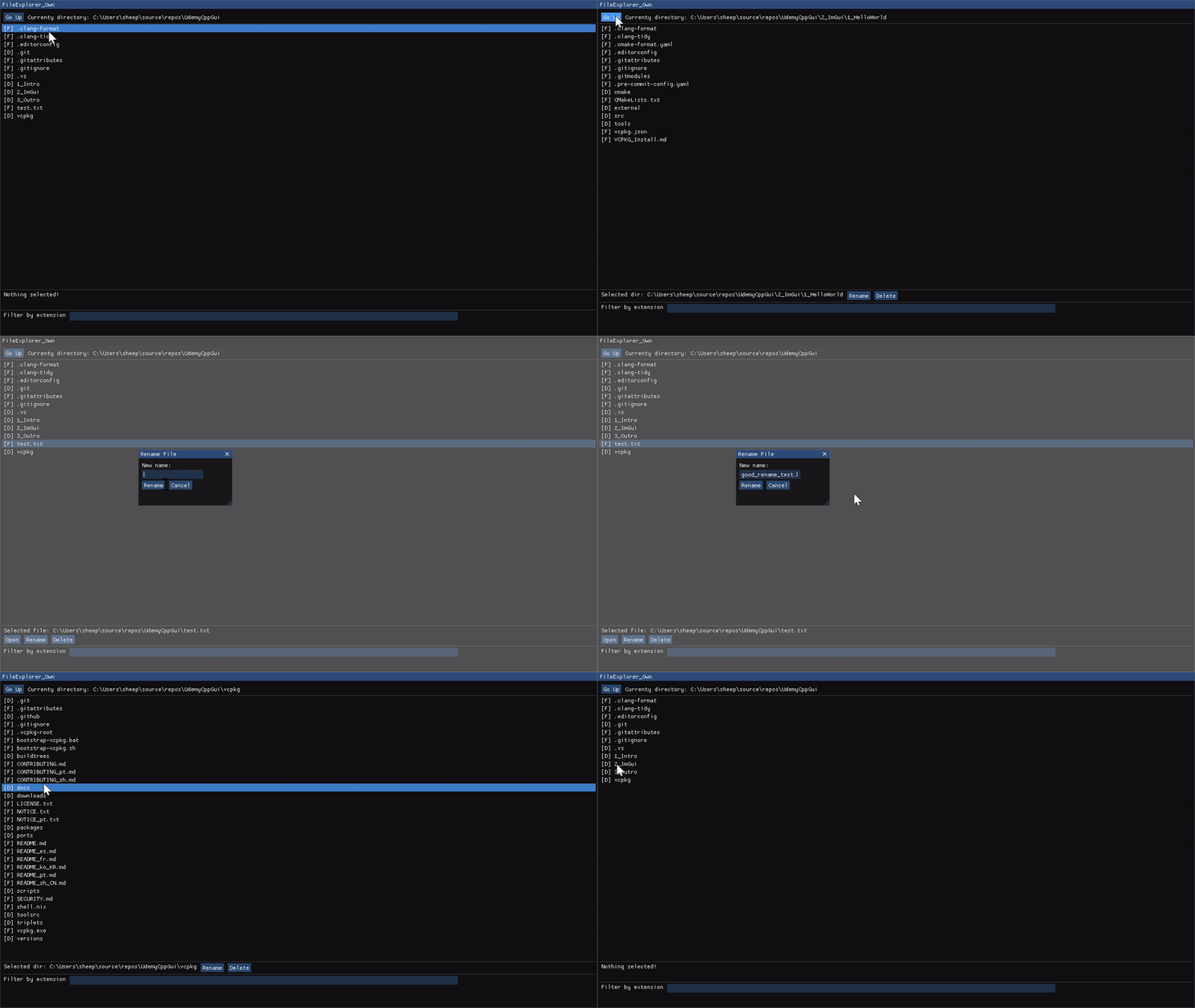
- 디렉터리와 일반 파일들의 목록이 보이는 파일탐색기 구현
- 파일을 열거나 삭제하거나 파일명을 수정하는 등의 작업이 가능하도록 구현
구현 코드
메인 함수
main.cpp의 프레임 반복문에서 호출되는 render 함수
void render(WindowClass &window_obj)
{
    window_obj.Draw("FileExplorer_Own");
}
FileExplorer의 구현코드
#include <cstdint>
#include <string_view>
#include <filesystem>
// c++17의 filesystem 헤더 추가

namespace fs = std::filesystem;

class WindowClass
{
public:
    // 생성자. WindowClass가 생성되며 현재파일위치를 가져옴
    WindowClass() : currentPath(fs::current_path()), selectedPath(fs::path{}) {};

    void Draw(std::string_view label);

private:
    void DrawMenu();                  // 윈도우의 최상단 메뉴바 출력
    void DrawContent();               // 현재 디렉토리의 파일 리스트 출력
    void DrawActions();               // 선택된 파일경로, open, rename, delete 버튼 출력
    void DrawFilter();                // 확장자 필터링용 입력필드 출력

    void renameFilePopup();           // 팝업 Dialog 로직
    void deleteFilePopup();

    // 실제 동작을 수행하는 함수
    bool renameFile(const fs::path& oldPath, const fs::path& newPath);
    bool deleteFile(const fs::path& path);

    void openFileWithDefaultEditor(); // 파일을 원하는 프로그램으로 열기 로직

private:
    fs::path currentPath;               // 현재 디렉토리
    fs::path selectedPath;              // 선택된 디렉토리

    bool renameDialogOpen = false;      // DialogOpen true/false
    bool deleteDialogOpen = false;
};

void render(WindowClass &window_obj);
void WindowClass::Draw(std::string_view label)
{
    constexpr static auto window_flags =
        ImGuiWindowFlags_NoResize | ImGuiWindowFlags_NoMove |
        ImGuiWindowFlags_NoCollapse | ImGuiWindowFlags_NoScrollbar;
    constexpr static auto window_size = ImVec2(1280.0F, 720.0F);
    constexpr static auto window_pos = ImVec2(0.0F, 0.0F);

    ImGui::SetNextWindowSize(window_size);
    ImGui::SetNextWindowPos(window_pos);

    // 윈도우의 시작지점
    ImGui::Begin(label.data(), nullptr, window_flags);

    DrawMenu();
    ImGui::Separator();   // 메뉴마다 구분선 넣기

    DrawContent();

    // 다음 요소의 커서 위치 지정.
    // (FileExplorer 윈도우크기 - 100px) 을 지정해서 bottom에서 100px 위쪽에 다음요소 출력
    ImGui::SetCursorPosY(ImGui::GetWindowHeight() - 100.0F);
    ImGui::Separator();

    DrawActions();
    ImGui::Separator();

    DrawFilter();

    // 윈도우설정 끝
    ImGui::End();
}
DrawMenu

최상단 메뉴를 그려주는 함수이다. Go Up 버튼으로 상위폴더로 이동할 수 있고, 현재경로를 출력한다.
상위폴더는
void WindowClass::DrawMenu()
{
    if (ImGui::Button("Go Up"))   // Go Up 레이블을 가진 버튼을 클릭하면 true가 리턴되어 내부 로직을 수행한다.
    {
        if (currentPath.has_parent_path())            // 부모경로가 있다면
            currentPath = currentPath.parent_path();  // 현재 경로를 부모경로로 업데이트
    }

    ImGui::SameLine();    // 위의 요소와 아래 요소를 같은 줄에 그린다.
    // 현재 디렉토리 출력. printf의 가변인자처럼 문자열을 포매팅할 수 있다.
    ImGui::Text("Currenty directory: %s", currentPath.string().c_str());
}
DrawContent
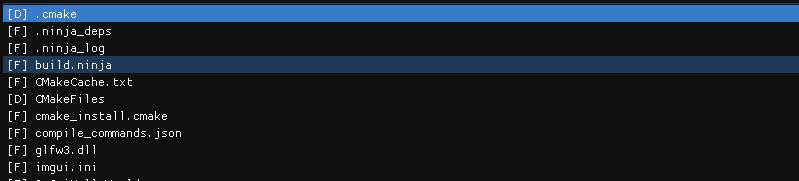
현재 경로의 파일들을 전부 가져와 이름들을 출력하고, 클릭하면 현재경로를 업데이트하거나 선택된경로를 업데이트한다.
void WindowClass::DrawContent()
{
    // 현재 경로의 디렉터리 이터레이터에서 요소를 하나씩 꺼낸다.
    for (const auto& entry : fs::directory_iterator(currentPath))
    {
        const auto is_selected = entry.path() == selectedPath;    // 선택됐는지 확인
        const auto is_directory = entry.is_directory();           // 현재 요소가 파일인지 디렉터리인지 확인
        const auto is_file = entry.is_regular_file();
        auto entry_name = entry.path().filename().string();       // 현재요소의 이름만

        // 디렉터리, 일반파일인지에 따라 출력할 문자열 변경
        if (is_directory)
            entry_name = "[D] " + entry_name;
        else if (is_file)
            entry_name = "[F] " + entry_name;

        // 선택 가능한 텍스트필드. Button처럼 클릭하면 true가 반환됨.
        // is_selected를 전달해서 선택됐다면 배경색 변경
        if (ImGui::Selectable(entry_name.c_str(), is_selected))
        {
            // 디렉토리인 경우 현재경로에 클릭한 파일명 추가
            if (is_directory)
                currentPath /= entry.path().filename();

            // 현재요소의 전체경로를 가져와서 selectedPath 에 저장
            selectedPath = entry.path();
        }
    }
}
DrawActions

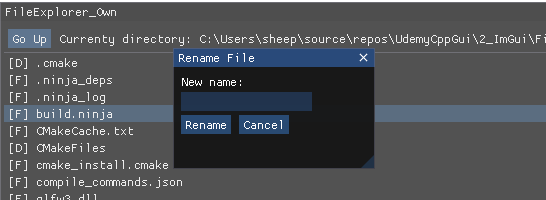
파일을 프로그램을 선택해서 열거나, 이름변경, 삭제하는 버튼을 그린다.
기능을 전부 구현해야해서 가장 기능이 크다.
DrawActions
void WindowClass::DrawActions()
{
    // 선택된 파일 종류에 따라 출력문자열 변경
    if (fs::is_directory(selectedPath))
        ImGui::Text("Selected dir: %s", selectedPath.string().c_str());
    else if (fs::is_regular_file(selectedPath))
        ImGui::Text("Selected file: %s", selectedPath.string().c_str());
    else
    {
        ImGui::Text("Nothing selected!");

        // 선택되지 않은경우 버튼이 표시되지 않도록 버튼의 자리를 차지하는 투명버튼을 생성
        // Alpha 값을 0으로 해서 PushStyleVar ~ PopStyleVar 사이의 요소를 투명화
        ImGui::PushStyleVar(ImGuiStyleVar_Alpha,
                            ImGui::GetStyle().Alpha * 0.0f);

        // 클릭여부에 따라 로직이 존재하지 않는 가짜버튼
        ImGui::Button("Non-clickable button");
        ImGui::PopStyleVar();

        // 선택되지 않은경우 Open, Rename, Delete 버튼이 보이지 않도록 리턴
        return;
    }

    // 파일인경우 Open 버튼 추가렌더링.
    // Open버튼 클릭 시 확장자에 맞는 프로그램으로 파일 열기
    if (fs::is_regular_file(selectedPath) && ImGui::Button("Open"))
        openFileWithDefaultEditor();

    ImGui::SameLine();

    // Rename 버튼을 클릭한 경우
    if (ImGui::Button("Rename"))
    {
        // "Rename File" 이라는 키를 가진 팝업을 오픈한다.
        renameDialogOpen = true;
        ImGui::OpenPopup("Rename File");
    }

    ImGui::SameLine();

    // Delete 버튼을 클릭한 경우
    if (ImGui::Button("Delete"))
    {
        // "Delete File" 팝업 오픈. DialogOpen 값을 관리하지 않음
        ImGui::OpenPopup("Delete File");
    }

    // 관련 팝업 정의 함수
    renameFilePopup();
    deleteFilePopup();
}
system 함수로 운영체제에 맞는 명령을 호출해서 파일을 확장자에 해당하는 프로그램으로 열 수 있도록 한다.
void WindowClass::openFileWithDefaultEditor()
{
#ifdef _WIN32
    const auto command = "start \"\" \"" + selectedPath.string() + "\"";
#elif __APPLE__
    const auto command = "open \"" + selectedPath.string() + "\"";
#elif __linux__
    const auto command = "xdg-open \"" + selectedPath.string() + "\"";
#endif
    std::system(command.c_str());
}
Delete 로직과 비교해보면 모달 열고닫는 방식이 다르다.
bool WindowClass::renameFile(const fs::path& old_path, const fs::path& new_path)
{
    try
    {
        // filesystem의 rename 함수를 호출해서 실제 파일 이름변경
        fs::rename(old_path, new_path);
        return true;
    }
    catch (const std::exception& e)
    {
        std::cerr << e.what() << '\n';
        return false;
    }
}

void WindowClass::renameFilePopup()
{
    // "Rename File" 팝업을 오픈한 경우, renameDialogOpen 함수가 false가 될때까지 팝업오픈
    if (ImGui::BeginPopupModal("Rename File", &renameDialogOpen))
    {
        // 팝업창 내부
        static char buffer_name[512] = {0, };

        ImGui::Text("New name: ");
        // 입력필드. label앞에 ###을 붙이면 label을 숨길 수 있다.
        // 버퍼사이즈까지 입력받을 수 있도록 함
        ImGui::InputText("###newName", buffer_name, sizeof(buffer_name));

        // Rename 버튼
        if (ImGui::Button("Rename"))
        {
            // 선택된 경로의 부모경로(선택한 파일명제외)에 변경할 파일명을 추가
            auto new_path = selectedPath.parent_path() / buffer_name;
            if (renameFile(selectedPath, new_path))
            {
                selectedPath = new_path;                            // 새 경로로 선택경로 변경
                renameDialogOpen = false;                           // Dialog 닫기
                std::memset(buffer_name, 0, sizeof(buffer_name));   // 입력필드 버퍼 초기화
            }
        }

        ImGui::SameLine();

        // 취소 버튼을 누른경우
        if (ImGui::Button("Cancel"))
        {
            renameDialogOpen = false;
            std::memset(buffer_name, 0, sizeof(buffer_name));
        }

        // 팝업은 여기까지
        ImGui::EndPopup();
    }
}
bool WindowClass::deleteFile(const fs::path& path)
{
    try
    {
        // filesystem의 remote 함수 호출로 해당 경로의 파일 삭제
        fs::remove(path);
        return true;
    }
    catch (const std::exception& e)
    {
        std::cerr << e.what() << '\n';
        return false;
    }
}

void WindowClass::deleteFilePopup()
{
    // "Delete File" 팝업 정의 시작
    if (ImGui::BeginPopupModal("Delete File"))
    {
        ImGui::Text("Are you sure you want to delete %s?",
            selectedPath.string().c_str());

        if (ImGui::Button("Yes"))
        {
            // 삭제가 성공한경우 selectedPath는 지워준다.
            if (deleteFile(selectedPath))
                selectedPath.clear();
            deleteDialogOpen = false;

            // 현재 팝업 닫기
            ImGui::CloseCurrentPopup();
        }

        ImGui::SameLine();

        if (ImGui::Button("No"))
        {
            ImGui::CloseCurrentPopup();
        }

        ImGui::EndPopup();
    }
}
DrawFilter

모든 파일의 확장자를 검사해서 몇개있는지 확인한다.
void WindowClass::DrawFilter()
{
    static char extension_filter[16] = { 0, };
    ImGui::Text("Filter by extension");
    ImGui::SameLine();
    ImGui::InputText("###inFilter", extension_filter, sizeof(extension_filter));

    if (std::strlen(extension_filter) == 0)
        return;

    auto filtered_file_count = 0;
    // 전체 파일을 검사해서 확장자에 해당하는 파일이 몇개있는지 검사
    for (const auto& entry : fs::directory_iterator(currentPath))
    {
        if (!fs::is_regular_file(entry))
            continue;

        if (entry.path().extension().string() == extension_filter)
            ++filtered_file_count;
    }

    ImGui::Text("filtered file count: %d", filtered_file_count);
}
Comments